
ADVERTISEMENT
ADVERTISEMENT
Wordpad is a powerful, free word processing application designed for a wide range of users, including bloggers, students, project managers, and writers. The app shines in its ability to transform ideas into neatly formatted documents without overwhelming users with complex features. The Wordpad app emphasizes simplicity and efficiency, allowing users to easily create notes, tasks, and lists of inspirations. With its robust functionalities, the Wordpad app offers a compelling alternative to more complex word processors, aligning itself as a go-to choice for anyone seeking an accessible yet efficient writing platform. The application is available for download on both Android and iOS, and its user-friendly interface ensures that both beginners and experienced wordsmiths can enjoy its multitude of features.
1. **User-Friendly Interface**: The layout of the Wordpad app facilitates seamless navigation and ease of use. Both seasoned writers and novices can quickly familiarize themselves with its functionalities.
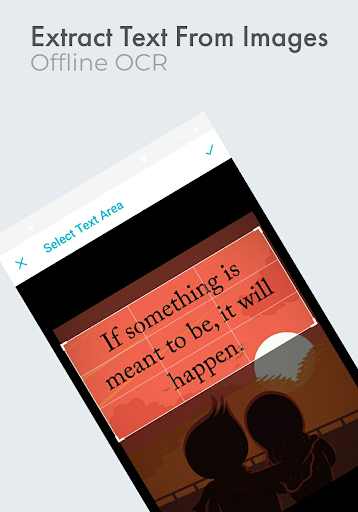
2. **Offline OCR Engine**: The built-in offline Optical Character Recognition (OCR) engine allows users to extract text from images effortlessly. This feature saves time and enhances productivity by eliminating the need for external tools.
3. **One-Click PDF and TXT Export**: The free Wordpad app enables users to transform their documents into PDF or TXT formats with just a single click, offering a convenient way to share work.
4. **Versatile Formatting Options**: Wordpad stands out for its extensive range of formatting tools, enabling users to customize their documents with various styles and layouts. Users can adjust font size and color (available in the Pro version), providing a tailored writing experience.
5. **Powerful Search and Reader Mode**: The deep search feature helps users quickly locate documents by searching with a single word. Additionally, the powerful reader mode offers a distraction-free environment to enjoy notes and written content.
1. **Limited Features in Free Version**: While the free Wordpad app is packed with features, some functionalities, like color adjustments and printing, are reserved for the Pro version. Users may find themselves wanting more customization options without committing to a paid version.
2. **Overall Performance**: Some users have reported occasional lagging, especially when working with larger documents or more intricate formatting. Consistency in performance can sometimes hinder the writing process.
3. **Lack of Advanced Tools**: Advanced users may miss features typically found in premium word processors, such as collaboration and version control functionalities, which are not fully supported in the Wordpad app.
1. **Enhanced Text-to-Speech Functionality**: The most recent update includes improvements to the text-to-speech engine, allowing for more natural reading speeds and pitch adjustments. Users can utilize this feature for effortless listening to their notes.
2. **Pro Version Features Unlocked**: A recent update has introduced additional features for the Pro version, such as advanced styling tools, which provide users with more flexibility in their document presentation.
3. **Improved Navigation and Search Features**: The app has seen enhancements in both navigation and search functionalities, helping users more easily locate and access their documents, streamlining the writing process significantly.
Starting with the Wordpad app is a straightforward process. To begin, users need to download Wordpad from the Google Play Store for Android or the Apple App Store for iOS. Once downloaded and installed, users will comply with the installation process. After completing the Wordpad installation, users can login Wordpad directly through the app. A user-friendly interface greets new users upon logging in, prominently displaying options to create documents or access pre-existing notes.
To create a document, simply tap the “New Document” button. From here, users can begin typing their content without the worry of formatting, as Wordpad handles that automatically. For those looking to jot down quick notes or list tasks, the app offers easy-to-navigate features for bullet points, numbering, and text alignment. Once the document is completed, users can either save their work or choose to export it as a PDF or TXT file effortlessly. Additionally, the built-in OCR tool allows users to open images and extract text quickly. With options readily available at your fingertips, the Wordpad app ensures a smooth writing and organizational experience.
For users who wish to enjoy audio notes, they can activate the text-to-speech feature, adjusting speed and pitch as preferred. This functionality makes it easy to review notes hands-free or to listen while multitasking.
User reviews provide valuable insights into the performance and features of the Wordpad app, alongside overall user satisfaction. Many users praise the Wordpad app for its simplicity and effectiveness, particularly how easy it is to create and share documents with just a few clicks. One user highlighted the convenience of the OCR capability, stating that it has “eliminated the hassle of retyping text from images,” making their workflow much smoother.
Another user noted the usefulness of the deep search feature, mentioning that it “saved so much time” when attempting to locate specific documents among a large collection. Users also appreciate the powerful reader mode, stating that it allows them to engage with their notes without distractions.
However, some reviews also point out the lack of advanced features offered in comparison to traditional word processors, especially regarding collaboration options. One critical user noted, “It’s great for personal use but does fall short when it comes to the collaborative environment.” Complaints regarding performance lag for larger documents were echoed by several users, accentuating the need for ongoing improvements.
Overall, the Wordpad app garners largely positive feedback for its clean interface, array of practical tools, and specifically its text-to-speech capabilities. Many users express excitement about the future developments outlined in the upcoming updates, hinting at a strong community interest in further refining the Wordpad experience.
In conclusion, the Wordpad application demonstrates its potential as an essential writing tool for various users. Its balance of simplicity and robustness captures the essence of user-friendly design while providing the necessary resources for anyone looking to efficiently create text-based documents. As users download Wordpad and experience its functionalities, it promises to be a reliable companion for all writing pursuits, leading to continued growth and enhancements in future updates.


ADVERTISEMENT


Welcome to OkayParks - your go-to destination for downloading the latest and most popular Android apps. Our mission is to provide a safe, reliable, and user-friendly platform for Android users to discover and download the best apps.
At OkayParks, our top priority is to deliver top-notch content that is relevant to our users. Our team of experts carefully selects and reviews each app before it is available for download on our platform. We also regularly update our app library to ensure our users can access the latest versions of their favorite apps.
At OkayParks, we provide a wide range of high-quality apps that cater to all your needs. Our platform is continuously updated with the latest and hot apps, ensuring users can access the most up-to-date apps.
We prioritize providing a seamless and hassle-free app download experience. Our website is easy to navigate, and our download process is quick and secure.
Thank you for choosing OkayParks as your trusted source for Android apps. We hope you enjoy using our platform and welcome your feedback and suggestions.


